
领先一步
VMware 提供培训和认证,助您加速进步。
了解更多
模型上下文协议 (MCP) 规范了AI应用程序如何与外部工具和资源交互。Spring作为主要贡献者之一,很早就加入了MCP生态系统,帮助开发和维护了官方MCP Java SDK,该SDK是基于Java的MCP实现的基础。在此贡献的基础上,Spring AI通过专用的Boot Starters和MCP Java Annotations全面支持MCP,使得构建能够无缝连接到外部系统的复杂AI驱动应用程序比以往任何时候都更加容易。
本博客介绍了核心MCP组件,并演示了如何使用Spring AI构建MCP服务器和客户端,展示了基本和高级功能。完整的源代码可在以下网址获取:MCP天气示例。
注意:此内容仅适用于Spring AI
1.1.0-SNAPSHOT或 SpringAI 1.1.0-M1+版本。
模型上下文协议 (MCP) 是一种标准化协议,使AI模型能够以结构化的方式与外部工具和资源交互。可以将其视为AI模型与现实世界之间的桥梁——允许它们通过一致的接口访问数据库、API、文件系统和其他外部服务。
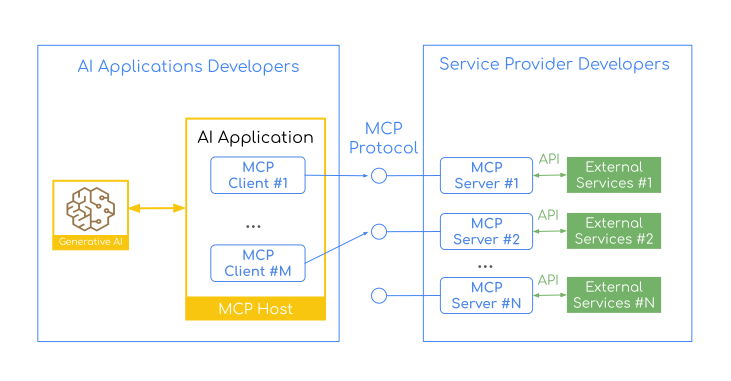
模型上下文协议遵循客户端-服务器架构,确保了关注点的明确分离。MCP服务器从第三方服务中暴露特定的功能(工具、资源、提示)。MCP客户端由宿主应用程序实例化,用于与特定的MCP服务器通信。每个客户端处理与一个服务器的一次直接通信。
宿主是用户交互的AI应用程序,而客户端是实现服务器连接的协议级组件。
MCP协议确保客户端和服务器之间完全、语言无关的互操作性。您可以拥有用Java、Python或TypeScript编写的客户端,与用任何语言编写的服务器进行通信,反之亦然。
这种架构在客户端和服务器端开发之间建立了明确的界限和责任,自然地形成了两个不同的开发者社区。
AI应用程序/宿主开发者
处理协调多个MCP服务器(通过MCP客户端连接)并与AI模型集成的复杂性。AI开发者构建AI应用程序,这些应用程序
MCP服务器(提供者)开发者
专注于将第三方服务中的特定功能(工具、资源、提示)作为MCP服务器暴露。服务器开发者创建的服务器
这种分离确保了服务器开发者可以专注于封装其领域特定服务,而无需担心AI编排。同时,AI应用程序开发者可以利用现有的MCP服务器,而无需了解每个第三方服务的复杂性。
这种分工意味着数据库专家可以为PostgreSQL创建一个MCP服务器,而无需理解LLM提示,而AI应用程序开发者可以使用该PostgreSQL服务器,而无需了解SQL内部机制。MCP协议充当了它们之间的通用语言。
Spring AI通过MCP客户端和MCP服务器Boot Starters支持这种架构。这意味着Spring开发者可以参与MCP生态系统的两方面——构建消费MCP服务器的AI应用程序,以及创建将基于Spring的服务暴露给更广泛AI社区的MCP服务器。
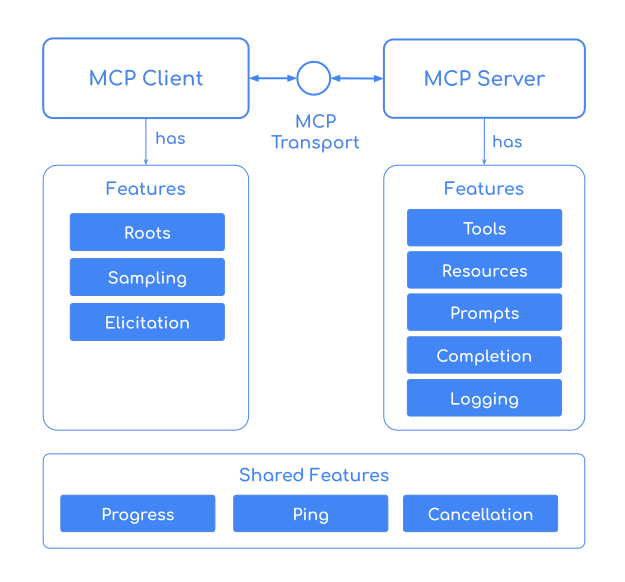
客户端和服务器共享,MCP提供了一套广泛的功能,使AI应用程序和外部服务之间能够无缝通信。
重要:工具由LLM拥有,与其他MCP功能(如提示和资源)不同。LLM(而不是宿主)决定何时、以何种顺序调用工具。宿主只控制哪些工具描述提供给LLM。
让我们构建一个提供实时天气预报信息的可流式HTTP MCP服务器。
创建一个新的 (mcp-weather-server) Spring Boot应用程序
@SpringBootApplication
public class McpServerApplication {
	public static void main(String[] args) {
		SpringApplication.run(McpServerApplication.class, args);
	}
}
<dependency>
    <groupId>org.springframework.ai</groupId>
    <artifactId>spring-ai-starter-mcp-server-webmvc</artifactId>
</dependency>
了解更多关于可用的服务器依赖选项。
在application.properties中启用可流式HTTP服务器传输
spring.ai.mcp.server.protocol=STREAMABLE
您可以使用STREAMABLE、STATELESS或SSE传输启动服务器。要启用STDIO传输,您需要设置spring.ai.mcp.server.stdio=true。
利用免费的天气REST API构建一个能够通过位置坐标检索天气预报的服务。
添加@McpTool和@McpToolParam注解以将getTemperature方法注册为MCP服务器工具
@Service
public class WeatherService {
public record WeatherResponse(Current current) {
public record Current(LocalDateTime time, int interval, double temperature_2m) {}
}
@McpTool(description = "Get the temperature (in celsius) for a specific location")
public WeatherResponse getTemperature(
@McpToolParam(description = "The location latitude") double latitude,
@McpToolParam(description = "The location longitude") double longitude) {
return RestClient.create()
.get()
.uri("https://api.open-meteo.com/v1/forecast?latitude={latitude}&longitude={longitude}¤t=temperature_2m",
latitude, longitude)
.retrieve()
.body(WeatherResponse.class);
}
}
./mvnw clean install -DskipTests

java -jar target/mcp-weather-server-0.0.1-SNAPSHOT.jar
这将在端口8080上启动mcp-weather-server。
MCP天气服务器启动并运行后,您可以使用各种符合MCP的客户端应用程序与之交互
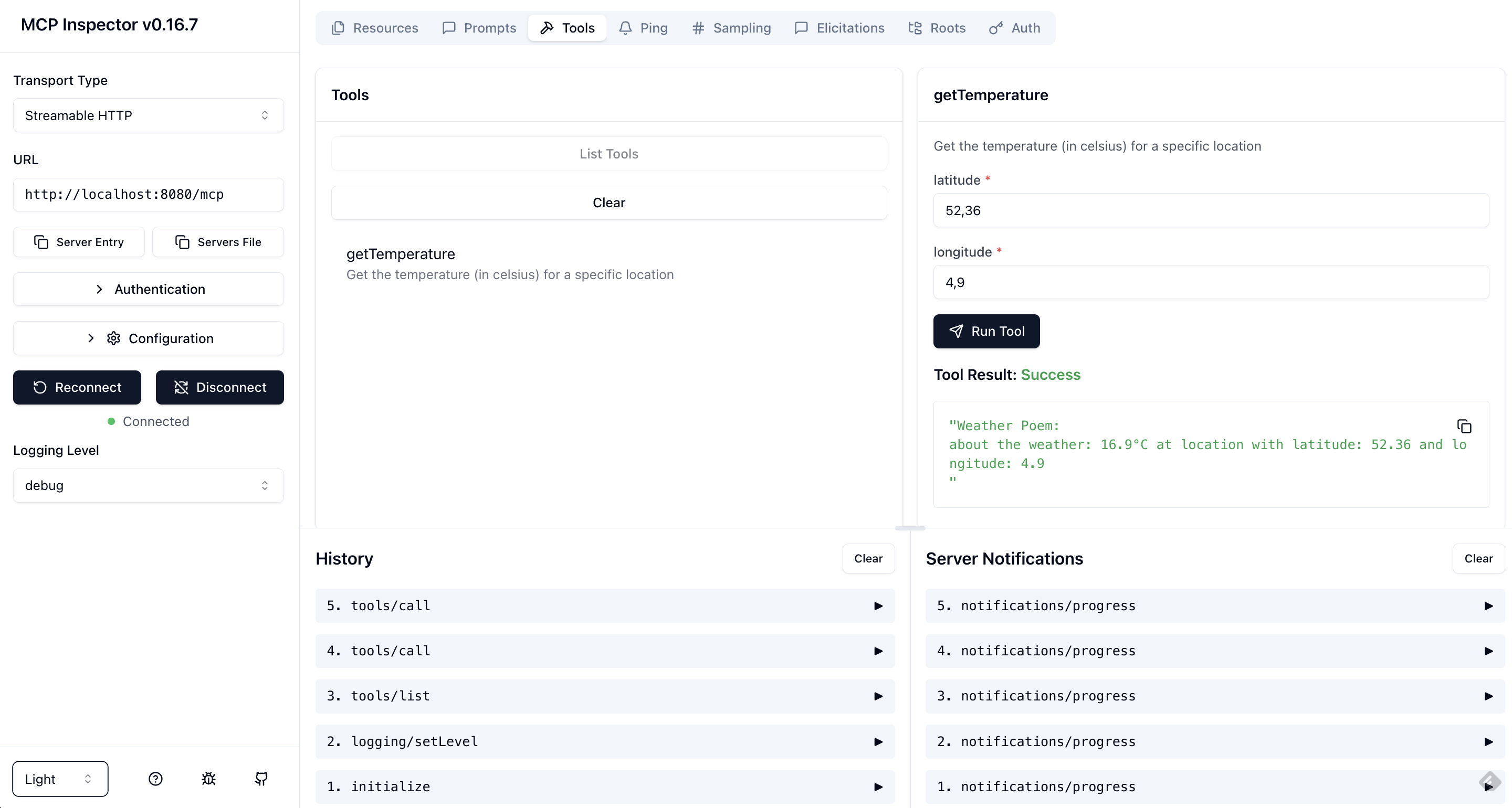
MCP检查器是一个交互式开发工具,用于测试和调试MCP服务器。要启动检查器,请运行
npx @modelcontextprotocol/inspector
在浏览器UI中,将传输类型设置为Streamable HTTP,URL设置为https://:8080/mcp。点击Connect建立连接。然后列出工具并运行getTemperature。
使用MCP Java SDK客户端以编程方式连接到服务器
var client = McpClient.sync(
HttpClientStreamableHttpTransport
	.builder("https://:8080").build())
.build();

client.initialize();

CallToolResult weather = client.callTool(
	new CallToolRequest("getTemperature",
			Map.of("latitude", "47.6062",
					"longitude", "-122.3321")));
其他符合MCP的AI应用程序/SDK
将您的MCP服务器连接到流行的AI应用程序
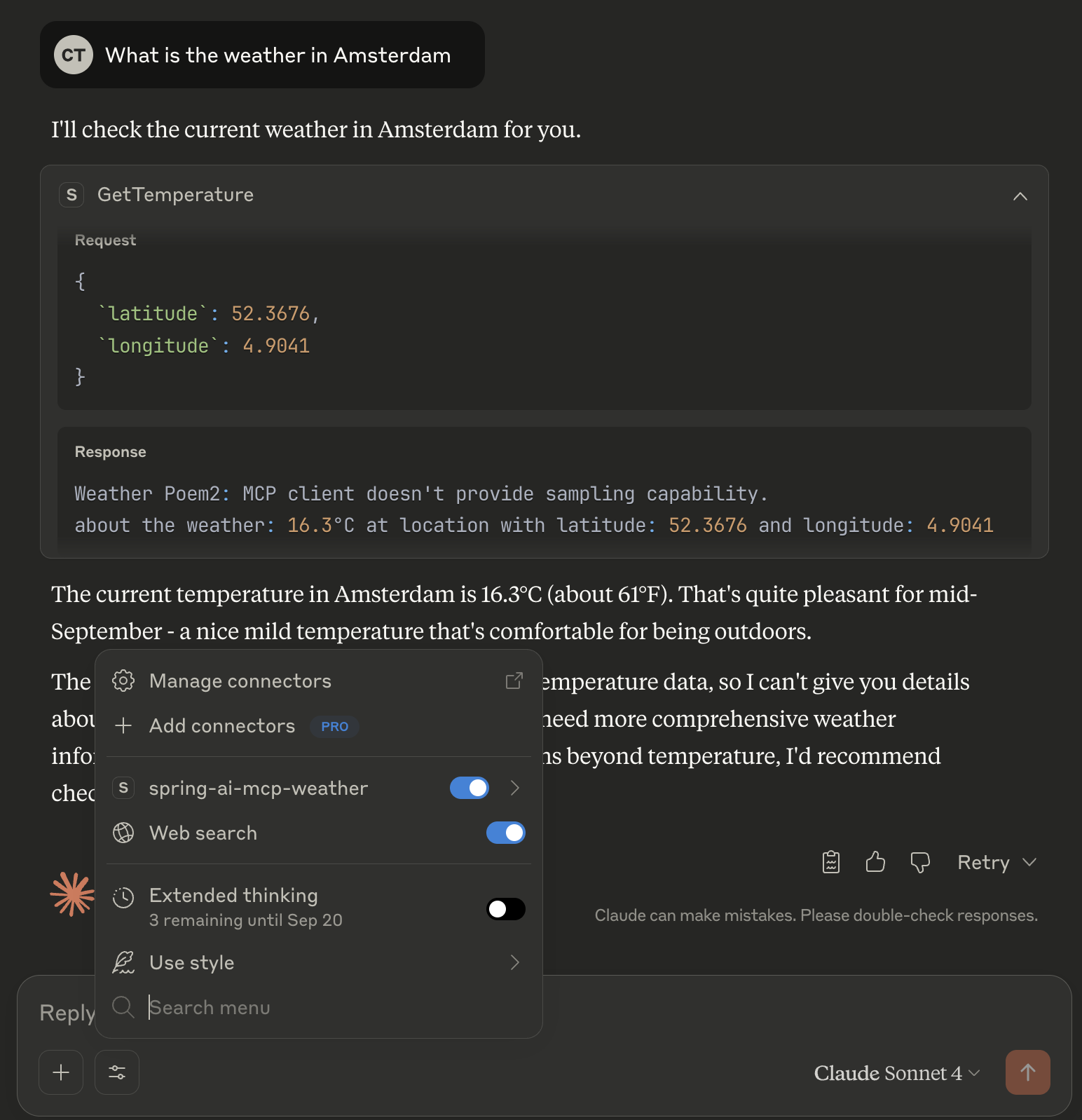
要与Claude桌面版集成,使用本地STDIO传输,请在Claude桌面版设置中添加以下配置
{
 "mcpServers": {
  "spring-ai-mcp-weather": {
  "command": "java",
  "args": [
	"-Dspring.ai.mcp.server.stdio=true",
	"-Dspring.main.web-application-type=none",
	"-Dlogging.pattern.console=",
	"-jar",
	"/path/to/mcp-weather-server-0.0.1.jar"]
  }
 }
}
将/absolute/path/to/替换为您的构建JAR文件的实际路径。
请遵循Claude桌面版的MCP服务器安装以获取进一步指导。Claude桌面版的免费版本不支持采样!
让我们扩展我们的MCP天气服务器,以演示包括日志、进度跟踪和采样在内的高级MCP功能。这些功能实现了服务器和客户端之间丰富的交互
在这个增强版本中,我们的天气服务器将向客户端记录其操作以实现透明度,在获取和处理天气数据时报告进度,并请求客户端的LLM生成一首关于天气预报的史诗般诗歌。
这是更新后的服务器实现
@Service
public class WeatherService {
public record WeatherResponse(Current current) {
public record Current(LocalDateTime time, int interval, double temperature_2m) {}
}
@McpTool(description = "Get the temperature (in celsius) for a specific location")
public String getTemperature(
McpSyncServerExchange exchange, // (1)
@McpToolParam(description = "The location latitude") double latitude,
@McpToolParam(description = "The location longitude") double longitude,
@McpProgressToken String progressToken) { // (2)
exchange.loggingNotification(LoggingMessageNotification.builder() // (3)
.level(LoggingLevel.DEBUG)
.data("Call getTemperature Tool with latitude: " + latitude + " and longitude: " + longitude)
.meta(Map.of()) // non null meta as a workaround for bug: ...
.build());
WeatherResponse weatherResponse = RestClient.create()
.get()
.uri("https://api.open-meteo.com/v1/forecast?latitude={latitude}&longitude={longitude}¤t=temperature_2m",
latitude, longitude)
.retrieve()
.body(WeatherResponse.class);
String epicPoem = "MCP Client doesn't provide sampling capability.";
if (exchange.getClientCapabilities().sampling() != null) {
// 50% progress
exchange.progressNotification(new ProgressNotification(progressToken, 0.5, 1.0, "Start sampling")); // (4)
String samplingMessage = """
For a weather forecast (temperature is in Celsius): %s.
At location with latitude: %s and longitude: %s.
Please write an epic poem about this forecast using a Shakespearean style.
""".formatted(weatherResponse.current().temperature_2m(), latitude, longitude);
CreateMessageResult samplingResponse = exchange.createMessage(CreateMessageRequest.builder()
.systemPrompt("You are a poet!")
.messages(List.of(new SamplingMessage(Role.USER, new TextContent(samplingMessage))))
.build()); // (5)
epicPoem = ((TextContent) samplingResponse.content()).text();
}
// 100% progress
exchange.progressNotification(new ProgressNotification(progressToken, 1.0, 1.0, "Task completed"));
return """
Weather Poem: %s
about the weather: %s°C at location: (%s, %s)
""".formatted(epicPoem, weatherResponse.current().temperature_2m(), latitude, longitude);
}
}
McpSyncServerExchange - exchange参数提供对服务器-客户端通信功能的访问。它允许服务器发送通知并向客户端发出请求。
@ProgressToken - progressToken参数启用进度跟踪。客户端提供此令牌,服务器使用它发送进度更新。
日志通知 - 向客户端发送结构化日志消息以进行调试和监控。
进度更新 - 向客户端报告操作进度(在本例中为50%),并附带描述性消息。
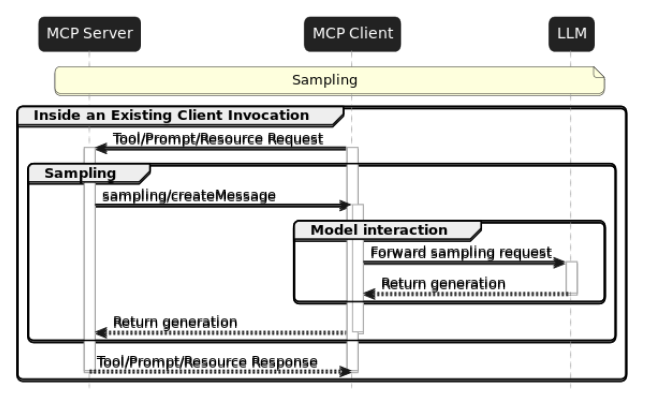
这允许服务器利用客户端的AI功能,创建双向AI交互模式。
增强后的天气服务现在不仅返回天气数据,还返回一首关于天气预报的创意诗歌,展示了MCP服务器和AI模型之间强大的协同作用。
让我们构建一个使用LLM并通过MCP客户端连接到MCP服务器的AI应用程序。
创建一个新的Spring Boot项目 (mcp-weather-client),并添加以下依赖
<dependency>
  <groupId>org.springframework.ai</groupId>
  <artifactId>spring-ai-starter-mcp-client</artifactId>
</dependency>

<dependency>
  <groupId>org.springframework.ai</groupId>
  <artifactId>spring-ai-starter-model-anthropic</artifactId>
</dependency>
了解关于可用依赖选项以配置不同的传输机制。
在application.yml中,配置与MCP服务器的连接
spring:
  main:
    web-application-type: none

  ai:
    # Set credentials for your Anthropic API account
    anthropic:
      api-key: ${ANTHROPIC_API_KEY}

    # Connect to the MCP Weather Server using streamable-http client transport
    mcp:
      client:
        streamable-http:
          connections:
            my-weather-server:
              url: https://:8080
请注意,配置已为服务器连接分配了my-weather-server名称。
创建一个使用连接到LLM和MCP天气服务器的ChatClient的客户端应用程序。
@SpringBootApplication
public class McpClientApplication {

	public static void main(String[] args) {
		SpringApplication.run(McpClientApplication.class, args).close(); // (1)
	}

	@Bean
	public ChatClient chatClient(ChatClient.Builder chatClientBuilder) { // (2)
		return chatClientBuilder.build();
	}

	String userPrompt = """
		Check the weather in Amsterdam right now and show the creative response!
		Please incorporate all creative responses from all LLM providers.
		""";

	@Bean
	public CommandLineRunner predefinedQuestions(ChatClient chatClient, ToolCallbackProvider mcpToolProvider) { // (3)
		return args -> System.out.println(
			chatClient.prompt(userPrompt) // (4)
				.toolContext(Map.of("progressToken", "token-" + new Random().nextInt())) // (5)
				.toolCallbacks(mcpToolProvider) // (6)
				.call()
				.content());
	}
}
应用程序生命周期管理 - 应用程序启动、执行天气查询、显示结果,然后干净地退出。
ChatClient配置 - 使用Spring AI的自动配置构建器创建一个已配置的ChatClient bean。构建器会自动填充
CommandLineRunner - 在应用程序上下文完全加载后自动运行。它注入了已配置的ChatClient用于AI模型交互,以及包含所有已注册的MCP工具的ToolCallbackProvider,这些工具来自连接的服务器。
AI提示 - 指示AI模型获取阿姆斯特丹的当前天气。AI模型会根据提示自动发现并调用适当的MCP工具。
进度令牌 - 使用toolContext将唯一的progressToken传递给带有@McpProgressToken参数注解的MCP工具。
MCP工具集成 - 这条关键行将ChatClient连接到所有可用的MCP工具
mcpToolProvider由Spring AI的MCP客户端启动器自动配置spring.ai.mcp.client.*.connections.*配置)创建一个服务类来处理来自服务器的MCP通知和请求。这些处理器是我们在上面实现的高级服务器功能的客户端对应部分,实现了MCP服务器和客户端之间的双向通信。
@Service
public class McpClientHandlers {

	private static final Logger logger = LoggerFactory.getLogger(McpClientHandlers.class);

	private final ChatClient chatClient;

	public McpClientHandlers(@Lazy ChatClient chatClient) { // Lazy is needed to avoid circular dependency
		this.chatClient = chatClient;
	}

	@McpProgress(clients = "my-weather-server") // (1)
	public void progressHandler(ProgressNotification progressNotification) {
		logger.info("MCP PROGRESS: [{}] progress: {} total: {} message: {}",
				progressNotification.progressToken(), progressNotification.progress(),
				progressNotification.total(), progressNotification.message());
	}

	@McpLogging(clients = "my-weather-server")
	public void loggingHandler(LoggingMessageNotification loggingMessage) {
		logger.info("MCP LOGGING: [{}] {}", loggingMessage.level(), loggingMessage.data());
	}

	@McpSampling(clients = "my-weather-server")
	public CreateMessageResult samplingHandler(CreateMessageRequest llmRequest) {

		logger.info("MCP SAMPLING: {}", llmRequest);

		String llmResponse = chatClient
				.prompt()
				.system(llmRequest.systemPrompt())
				.user(((TextContent) llmRequest.messages().get(0).content()).text())
				.call()
				.content();

		return CreateMessageResult.builder().content(new TextContent(llmResponse)).build();
	}
}
进度处理器 - 接收来自服务器长时间运行操作的实时进度更新。当服务器调用exchange.progressNotification(...)时触发。例如,天气服务器在开始采样时发送50%的进度,完成时发送100%。通常用于显示进度条、更新UI状态或记录操作进度。
日志处理器 - 接收来自服务器的结构化日志消息以进行调试和监控。当服务器调用exchange.loggingNotification(...)时触发。例如,天气服务器记录“调用getTemperature工具,纬度:X,经度:Y”。用于调试服务器操作、审计跟踪或监控仪表板。
采样处理器 - 最强大的功能。它使服务器能够从客户端的LLM请求AI生成的内容。用于双向AI交互、创意内容生成、动态响应。当服务器调用带有采样功能检查的exchange.createMessage(...)时触发。执行流程如下
基于注解的路由:clients = "my-weather-server"属性确保处理器仅处理来自配置中定义的特定MCP服务器连接的通知:spring.ai.mcp.client.streamable-http.connections.[my-weather-server].url。
如果您的应用程序连接到多个MCP服务器,请使用clients属性将每个处理器分配给相应的MCP客户端。
@McpProgress(clients = {"weather-server", "database-server"})  // Handle progress from multiple servers
public void multiServerProgressHandler(ProgressNotification notification) {
	// Handle progress from both servers
}

@McpSampling(clients = "specialized-ai-server")  // Handle sampling from specific server
public CreateMessageResult specializedSamplingHandler(CreateMessageRequest request) {
	// Handle sampling requests from specialized AI server
}
ChatClient上的@Lazy注解可以防止在ChatClient也依赖于MCP组件时可能出现的循环依赖问题。
双向AI通信:采样处理器创建了一个强大的模式,其中
服务器(领域专家)可以利用客户端的AI功能
客户端的LLM根据服务器提供的上下文生成创意内容
这实现了超越简单工具调用的复杂AI-AI交互
这种架构使MCP客户端成为服务器操作中的反应式参与者,实现了复杂的交互,而不仅仅是被动的工具消费。
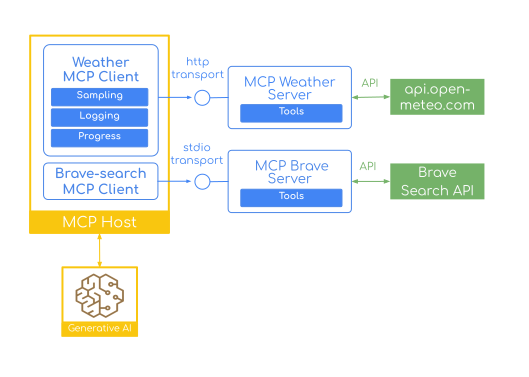
使用不同的传输连接到多个MCP服务器。以下是如何在您的天气服务器旁边添加Brave搜索MCP服务器进行网页搜索的示例
spring:
  ai:
    anthropic:
      api-key: ${ANTHROPIC_API_KEY}
    mcp:
      client:
        streamable-http:
          connections:
            my-weather-server:
              url: https://:8080
        stdio:
          connections:
            brave-search:
              command: npx
              args: ["-y",
				"@modelcontextprotocol/server-brave-search"]
它使用STDIO客户端传输。
现在您的LLM可以在单个提示中结合天气数据和网页搜索
String userPrompt = """
	Check the weather in Amsterdam and show the creative response!
	Please incorporate all creative responses.

	Then search online to find publishers for poetry and list top 3.
	""";
确保您的MCP天气服务器已启动并运行。
然后构建并启动您的客户端
./mvnw clean install -DskipTests

java -jar target/mcp-weather-client-0.0.1-SNAPSHOT.jar
Spring成熟的开发模型与MCP标准化协议的结合,为下一代AI应用程序奠定了坚实的基础。无论您是构建聊天机器人、数据分析工具还是开发助手,Spring AI的MCP支持都能为您提供所需的构建块。
本介绍涵盖了基本的MCP概念,并演示了如何使用Spring AI的Boot Starters构建MCP服务器和客户端,并实现了基本的工具功能。然而,MCP生态系统提供了更复杂的功能,我们将在未来的博客文章中进行探讨。
Java MCP注解深入探讨:学习如何利用Spring AI的基于注解的方法创建更易于维护和声明式的MCP实现,包括高级注解模式和最佳实践。
超越工具 - 提示、资源和补全:探索如何实现MCP的全套功能,包括共享提示模板、动态资源提供和智能自动补全功能,这些功能使您的MCP服务器更加用户友好和强大。
授权支持 - 保护MCP服务器:使用OAuth 2保护您的MCP服务器,并确保只有授权用户才能访问工具、资源和其他功能。为您的MCP客户端添加授权支持,以便它们可以获取OAuth 2令牌以与安全的MCP服务器进行身份验证。
准备好开始了吗?查看示例应用程序,探索Spring AI和MCP与AI集成的全部潜力。
有关最新更新和全面文档,请访问Spring AI参考文档。