
领先一步
VMware 提供培训和认证,助您加速进步。
了解更多如今,应用程序被构建为一系列小的独立上游服务。这加快了开发速度,并使模块能够专注于特定的职责,从而提高它们的质量。这是使用微服务方法的主要优势之一。然而,从一个服务跳到另一个服务会增加额外的延迟,当服务没有响应时,这种延迟会急剧增加。
如果您运行微服务,您希望防止上游服务在未正常工作时被调用。即使使用熔断器模式,也可能导致响应时间延迟。因此,有时最好主动检查上游服务,以验证它们在需要之前是否已准备就绪。
健康检查是一种根据服务状态确定其是否能正确响应的方法,可防止超时和错误。
被动健康检查是在请求处理期间进行的。如果服务最终不健康,应用程序将返回失败并标记该端点不健康。这可能会增加额外的延迟。
主动健康检查会在接收请求之前在后台检查并剔除不健康的服务。它不会增加额外的延迟。
最后但同样重要的是,这些功能可以与熔断器库结合使用,立即回退到备用端点,而不会遭受首次失败的惩罚。
目标是让路由通过负载均衡策略将请求转发到健康的上游服务。
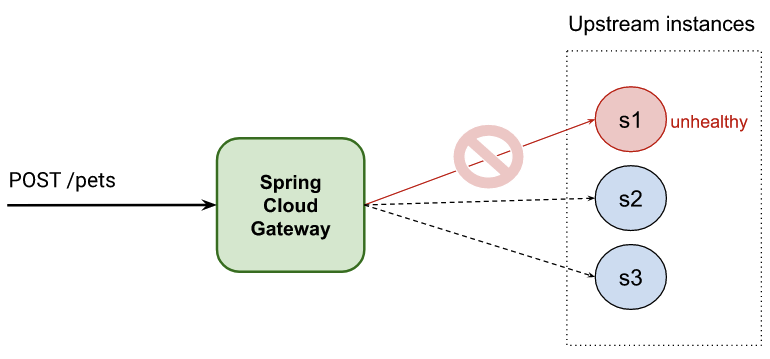
本文分为两部分
Spring 中有一些功能可以帮助您实现主动健康检查。
Spring Cloud Gateway Spring Cloud Gateway 提供了一个基于 Spring 和 Java 构建 API 网关的库。它通过 LoadBalancerClientFilter/ReactiveLoadBalancerClientFilter 全局过滤器支持上述功能。在本文中,您可以看到使用这些全局过滤器之一的不同方法。
不过,首先,让我们探讨一些这些功能。
Spring Cloud 中包含一个用于负载均衡的全局过滤器,可以通过使用特殊的 URI 表示法激活:lb://your-service-name。
spring:
 cloud:
   gateway:
     routes:
       - id: myRoute
         uri: lb://your-service-name
         predicates:
         - Path=/service/**
负载均衡器过滤器 ReactiveLoadBalancerClientFilter(适用于响应式应用程序)将检测 URI 并将其替换为与“your-service-name”关联的可用端点。
请注意,您需要将“your-service-name”注册到服务发现注册中心。我们将在以下部分中看到不同的注册方法。
默认情况下,流量会路由到上游服务,即使它们不健康。为了防止选中一个不好的服务,您可以启用 Spring Cloud 的负载均衡器客户端提供的 health-check 配置。
    spring:
      cloud:
        loadbalancer:
          configurations: health-check
所有端点将通过自动使用 Spring Boot Actuator 健康端点定期检查。您还可以自定义一些选项,例如 spring.cloud.loadbalancer.health-check.<your-service-name>.path 和 spring.cloud.loadbalancer.health-check.interval。
默认的健康检查配置使用
/actuator/health端点检查上游服务端点,这要求在您的上游服务中激活 Spring Actuator。
有关更多选项,请参阅 LoadBalancerClientsProperties 和 LoadBalancerProperties 类。
Spring Cloud Gateway 有一个内置功能,它将部署所有可用作路由的服务。本文描述的是相反的情况,即我们声明了负载均衡的路由,包括主动健康检查。
在上一节中,您指定了一个负载均衡的 URI (lb://your-service-name),但现在您需要注册与 URI 的服务名称关联的端点。我们将在以下部分中探讨一些方法。
您可以通过配置 spring.cloud.discovery.client.simple.instances 属性来静态激活客户端负载均衡。它是一个映射,其键是服务名称(由 lb:// URI 使用),值是一个 org.springframework.cloud.client.ServiceInstance 对象数组,指向各个上游服务。
静态负载均衡的一些优点包括:
问题是您在配置中静态设置了上游服务。如果需要更改列表,则需要重新启动应用程序。
示例
spring:
  cloud:
    gateway:
      routes:
        - uri: lb://hello-service # Load Balancer URI handled by ReactiveLoadBalancerClientFilter
          predicates:
            - Path=/hello
    loadbalancer:
      configurations: health-check # Required for enabling SDC with health checks
    discovery:
      client:
        simple: # SimpleDiscoveryClient to configure statically services
          instances:
            hello-service:
              - secure: false
                port: 8090
                host: localhost
                serviceId: hello-service
                instanceId: hello-service-1
              - secure: false
                port: 8091
                host: localhost
                serviceId: hello-service
                instanceId: hello-service-2
# Run server 1
SERVER_PORT=8090 ./gradlew :service:bootRun
# Run server 2
SERVER_PORT=8091 ./gradlew :service:bootRun
curl https://:8090/actuator/health
{"status":"UP"}
curl localhost:8090/hello
{ "message": "hello world!"}%
./gradlew :1-service-disc-by-properties:bootRun
curl localhost:8881/hello
{ "message": "hello world from port 8090!"}%
curl localhost:8881/hello
{ "message": "hello world from port 8091!"}%
您可能需要多次运行前面的命令才能从不同的服务器获取响应。
curl localhost:8090/status/false -X PUT
curl https://:8090/actuator/health
{"status":"DOWN"}
您可能会收到端口 8090 上的一个响应,因为在您发送请求时健康检查尚未检查该端点。间隔可以通过属性 spring.cloud.loadbalancer.health-check.interval 进行修改。
此外,您可能会看到一些消息,描述其中一个上游端点不健康,因此不可用。
2023-05-08 14:59:53.151 DEBUG 9906 --- [ctor-http-nio-3] r.n.http.client.HttpClientOperations     : [12d42e83-77, L:/127.0.0.1:57439 - R:localhost/127.0.0.1:8090] Received response (auto-read:false) : RESPONSE(decodeResult: success, version: HTTP/1.1)
HTTP/1.1 503 Service Unavailable
curl localhost:8881/hello
{ "message": "hello world from port 8091!"}%
curl localhost:8091/status/false -X PUT
curl localhost:8881/hello
{"timestamp":"2023-05-08T13:07:48.704+00:00","path":"/hello","status":503,"error":"Service Unavailable","requestId":"6b5d6010-199"}%
静态配置的灵活性不高,但使用 Eureka 作为服务发现可以消除这一缺点。
代价是您的架构需要一个新的组件,这可能会增加您的维护负担。这对于某些客户来说可能不是一个选择。
以下示例配置了 Eureka 集成。
    spring:
      application:
        name: scg-client-with-eureka
      cloud:
        loadbalancer:
          configurations: health-check # Note: required for enabling SDC with health checks - remove this line if you want to reproduce issues because not using health checks in LB
          # Note: LoadBalancerCacheProperties.ttl (or spring.cloud.loadbalancer.cache.ttl) is 35 by default - You will need to wait 35secs after an instance turns healthy
        gateway:
          httpclient:
            wiretap: true
          routes:
            - uri: lb://hello-service
              predicates:
                - Path=/headers
              filters:
                - StripPrefix=0

    eureka:
      client:
        webclient:
          enabled: true
        serviceUrl:
          defaultZone: https://:8761/eureka
        fetchRegistry: true
        registerWithEureka: false
      instance:
        preferIpAddress: true
./gradlew :eureka-server:bootRun
等待直到您看到 Eureka 服务器已启动。
2023-06-26 12:51:46.901 INFO 88601 --- [ Thread-9] e.s.EurekaServerInitializerConfiguration : Started Eureka Server
eureka 配置文件的服务器# Run server 1
SPRING_PROFILES_ACTIVE=eureka SERVER_PORT=8090 ./gradlew :service:bootRun
# Run server 2
SPRING_PROFILES_ACTIVE=eureka SERVER_PORT=8091 ./gradlew :service:bootRun
您应该在服务器的日志中看到服务实例已添加到 Eureka 中(步骤 1)。
2023-06-26 12:52:50.805  INFO 88601 --- [nio-8761-exec-3] c.n.e.registry.AbstractInstanceRegistry  : Registered instance HELLO-SERVICE/192.168.0.14:hello-service:8090 with status UP (replication=true)
2023-06-26 12:53:29.127  INFO 88601 --- [nio-8761-exec-9] c.n.e.registry.AbstractInstanceRegistry  : Registered instance HELLO-SERVICE/192.168.0.14:hello-service:8091 with status UP (replication=true)
访问 https://:8761/ 并检查服务器是否包含为应用程序 hello-service 的实例。
运行 Spring Cloud Gateway
SERVER_PORT=8883 ./gradlew :3-eureka-service-disc:bootRun
5.测试 Spring Cloud Gateway 负载均衡器
curl localhost:8883/hello
{ "message": "hello world from port 8090!"}%
curl localhost:8883/hello
{ "message": "hello world from port 8091!"}%
curl localhost:8090/status/false -X PUT
您应该在 Eureka 仪表板中看到只有一个实例可用,并且会看到一些日志消息抱怨端口 8090 上的服务不可用。健康检查不是即时的,因此您可能需要等待几秒钟才能看到实例被标记为 DOWN。
如您所见,Spring Cloud Gateway 提供了一个创建自定义过滤器的选项。它还允许您应用过滤器和更改路由而无需重新启动网关。
在本节中,您可以看到一个自定义过滤器实现,它通过使用 Spring Cloud Gateway 路由配置来设置服务的负载均衡和健康检查。
如果您的项目中已经有一个服务发现服务器,这可能不是您的最佳选择。如果没有,这是一种简单且经济实惠的方式,可以将两个强大功能集成到您的项目中。
    spring:
      application:
        name: custom-service-disc
      cloud:
        loadbalancer:
          configurations: health-check # Note: required for enabling SDC with health checks - remove this line if you want to reproduce issues because not using health checks in LB
          # Note: LoadBalancerCacheProperties.ttl (or spring.cloud.loadbalancer.cache.ttl) is 35 by default - You will need to wait 35secs after an instance turns healthy
        gateway:
          routes:
            - uri: lb://hello-service
              id: load-balanced
              predicates:
                - Path=/load-balanced/**
              filters:
                - StripPrefix=1
                - LoadBalancer=localhost:8090;localhost:8091;localhost:8092
新的 LoadBalancer 路由过滤器允许您配置与 lb://hello-service 负载均衡器 URI 关联的上游服务端点。
@Component
public class LoadBalancerGatewayFilterFactory extends AbstractGatewayFilterFactory<LoadBalancerGatewayFilterFactory.MyConfiguration> {

	// ...

	@Override
	public GatewayFilter apply(MyConfiguration config) {
		return (exchange, chain) -> {
			final Route route = exchange.getAttribute(GATEWAY_ROUTE_ATTR);
			if (StringUtils.hasText(config.getInstances()) && route.getUri().getScheme().equals("lb")) {
				config.getServiceInstances(route.getUri().getHost()).forEach(discoveryClient::addInstance);
			}

			return chain.filter(exchange);
		};
	}
如果路由与 lb://<service-host> 模式匹配,LoadBalancerGatewayFilterFactory 会将来自过滤器配置的所有上游服务端点与 service-host 相关联。
在底层,一个新的 ReactiveCustomDiscoveryClient 发现客户端实现已包含在我们的代码中,用于管理上游服务端点。Spring 会检测到这样的 bean 并将其在用于确定可用端点的 DiscoveryClient 列表中优先。
# Run server 1
SERVER_PORT=8090 ./gradlew :service:bootRun
# Run server 2
SERVER_PORT=8091 ./gradlew :service:bootRun
curl https://:8090/actuator/health
{"status":"UP"}
curl localhost:8090/hello
{ "message": "hello world!"}%
SERVER_PORT=8882 ./gradlew :2-custom-service-disc:bootRun
curl localhost:8882/hello
{ "message": "hello world from port 8090!"}%
curl localhost:8882/hello
{ "message": "hello world from port 8091!"}%
您可能需要多次运行前面的命令才能从不同的服务器获取响应。
curl localhost:8090/status/false -X PUT
curl https://:8090/actuator/health
{"status":"DOWN"}
您可能会收到端口 8090 上的一个响应,因为在您发送请求时健康检查尚未检查该端点。间隔可以通过 spring.cloud.loadbalancer.health-check.interval 属性进行修改。
此外,您可能会看到一些消息,描述其中一个上游端点不健康,因此不可用。
2023-05-08 15:59:53.151 DEBUG 9906 --- [ctor-http-nio-2] r.n.http.client.HttpClientOperations     : [12d42e83-77, L:/127.0.0.1:57439 - R:localhost/127.0.0.1:8090] Received response (auto-read:false) : RESPONSE(decodeResult: success, version: HTTP/1.1)
HTTP/1.1 503 Service Unavailable
curl localhost:8882/hello
{ "message": "hello world from port 8091!"}%
curl localhost:8091/status/false -X PUT
curl localhost:8882/hello
{"timestamp":"2023-05-08T14:07:48.704+00:00","path":"/hello","status":503,"error":"Service Unavailable","requestId":"6b5d6010-199"}%
在本文中,您看到了在项目中实现负载均衡和主动健康检查的多种方法。
总而言之,您还看到了,如果您不需要向架构中添加额外的组件,Spring Cloud Gateway 方法是一个不错的选择。
想了解更多关于 Spring Cloud 的信息吗?欢迎在线加入我们,参加 Spring Academy!
想要通过在路由中添加一个属性就能获得主动健康检查,而无需亲自动手吗?请查看我们支持 Kubernetes 的商业平台。